13 October 2026
Claude now edits your Google documents directly
The biggest news this week is that Claude can now work directly in Google Docs, Sheets and Slides.
With Claude for Google Workspace, you can open Claude next to the file you are working in and have it make changes directly in the document, spreadsheet or presentation.
Gemini has also gained skills, so you can save instructions for tasks you do again and again. Claude has also gained Motion, which can turn your existing material into short animations.
At the bottom you will find a method that makes it easier to check answers about your own documents.
In short
- Claude for Google Workspace → Use Claude directly in Google Docs, Sheets and Slides.
- Skills in Gemini → Save the instructions for a recurring task, and reuse them with `/` and the name of your skill.
- Claude Motion → Create a short animation from your text, your charts and your images.
- Ugens metode → Ask the AI to show exactly where in the document the answer comes from.
- Også i denne uge → GPT-6 for everyone in ChatGPT, audio file uploads and a hidden watermark in the EU.
Claude can now work directly in Google Docs, Sheets and Slides
Anthropic has launched Claude for Google Workspace in public beta.
Among other things, it consists of a Google Workspace add-on that opens Claude in a sidebar next to the file you are working in.
Claude can see the document, spreadsheet or presentation you have open. It can also see the text, cells or slides you have selected, and make changes directly in the file.
Previously, Claude could use connectors to pull information from Google Drive. Now it can also work directly in the open Google files.
Imagine a spreadsheet where the dates in one column are written in three different ways.
You can ask Claude to standardise the format. Instead of telling you which cells to fix yourself, Claude can change them directly in the sheet.
The same applies in Google Docs and Slides. For example, you can select a paragraph and ask Claude to rewrite it, or have it work on specific slides in a presentation.
By default, you can review the changes before they become part of the file.
Claude for Google Workspace is in public beta on all paid Claude plans. The add-on is installed from the Google Workspace Marketplace. If you use a work account, your administrator can control whether it is available.
At the same time, Anthropic has launched Google Docs, Sheets, and Slides connectors. They make it possible to create and edit Google files directly from Claude, without first opening them in Google Workspace.
What it means: Claude can now work in the file itself instead of only giving you an answer that you then have to move over. That is especially useful in long documents and spreadsheets, where you would otherwise spend time finding and fixing the right places.
Gemini can save the instructions for tasks you do again and again
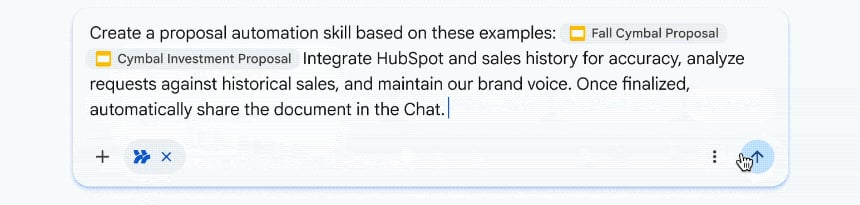
Google has launched skills in Gemini.
A skill is a set of instructions that you save and can use again.
If you start a new chat today with the same type of task, you often have to explain the same rules to Gemini again. With skills, you can save the instructions once.
Imagine that you often write proposals for clients.
You can create a skill with the rules for how your proposals should be structured, what tone they should have, and which information must always be included. You can also add reference files that Gemini should use.
When you later need to write a new proposal, you type `/` and the name of your skill in the prompt field and give Gemini the details about the new client.
Gemini can also help you build a skill from an existing chat.
Skills replace Gems. Google is moving existing Gems over to skills as Gems are phased out.
The feature started rolling out to personal accounts on 30 September and is also coming to Google Workspace customers.
What it means: If you have a task that follows the same rules every time, you do not need to write the whole instruction from scratch. You can save it as a skill and get more consistent results from task to task.
Claude Motion can turn your material into a short animation
Anthropic has also launched Claude Motion.
Motion is made for short animations of the content you already work with.
That could be a report, a chart, images or text that needs to be explained in a more visual way.
Imagine that you need to present the quarter's results to the whole company.
You can give Claude the report and ask Motion to make a 30-second animation that first shows revenue, then the biggest change, and finally the products that drove the growth.
Claude creates the animation as an Artifact from a Motion template.
It is built as code that animates text, charts, shapes and images. In other words, Motion does not use a video generation model to create the animation itself.
That also means you can change individual parts afterwards. For example, you can correct a number, change a word or adjust the timing without having to generate the whole animation again.
You can ask Claude for changes directly in the chat or edit the animation in the editor. When it is finished, it can be exported as an MP4 file.
Claude Motion is in beta on Team and Enterprise. On Team, the feature is on by default. On Enterprise, an Owner must first enable it under Organization settings > Artifacts.
What it means: You can make a short visual explanation of your existing work without first building a video in a separate program. That is especially useful for charts, trends and processes that are hard to explain on a single static slide.
Also this week
- GPT-6 has come to the regular chat in ChatGPT → The model is available on all plans, including the free version, and ChatGPT can now answer with charts and small interactive tools, among other things.
- You can upload audio files to ChatGPT → Upload a meeting recording, for example, and ask ChatGPT for a transcript or a summary. The feature requires a paid plan.
- ChatGPT gets a hidden watermark in text in the EU → Text from ChatGPT is marked through patterns in word choice, so it can later be recognised as AI-generated.
Ask the AI to show where in the document the answer is
When you ask questions about a long document, AI can save you a lot of time.
The hard part is knowing whether the answer is actually in the document.
A model can mix the content of the document with its other knowledge. It can also fill in something that is missing with an answer that sounds plausible.
Imagine that you have a 30-page contract and ask:
Which deadlines should we be aware of?
The AI finds five dates.
If you want to check them, you would otherwise have to find the five places in the contract yourself afterwards.
A simple solution is to add:
Under each point, write the exact quote from the document that the answer is based on, and where it is.
Now you get both the answer and the place in the document you can check it against.
Feel free to add one more line:
If the answer is not in the document, say so instead of guessing.
The two instructions each have their own function.
The first makes the answer easy to check.
The second tells the AI to say so if the document does not contain the answer.
Use the method especially for contracts, reports, policies and other documents where a small detail can change the meaning.
The method works in ChatGPT, Claude, Copilot and Gemini.
Worth reading
- Simon Willison on Claude Haiku 5.5 → A look at Anthropic's new small and fast model, and which tasks it is built for.
- Anthropic cuts its internal tests off from the internet → The decision came after an agent under testing sent a false tip to the police in Philadelphia.
- Can AI agents keep your data private? → The Verge looks at what OpenAI and other companies promise about privacy when agents get access to more of your tools.