6 October 2026
ChatGPT gets an agent that keeps working without you
The biggest news this week is ChatGPT Dots. It is a new type of agent that can take responsibility for a task and follow it over time.
That means the work does not necessarily stop when you leave the conversation.
Most people in Denmark cannot use Dots yet. Still, it shows quite clearly how ChatGPT is changing from a tool you ask into a tool that can keep up with the work.
At the bottom you will also find a method you can use right now to get more tasks done right the first time.
In short
- ChatGPT Dots → Give an agent responsibility for a task, and let it keep up when something changes.
- Gemini 4 Argon → Google's new top model is built for big tasks with a lot of information.
- ChatGPT Space → Create documents with ChatGPT that can pull in new information and stay up to date.
- Ugens metode → Describe what the finished result should look like.
- Også i denne uge → Claude Sonnet 5.5, GPT-6.1 Sol and new features in Copilot for SharePoint.
ChatGPT can follow a task, even when you are not in the chat
OpenAI has launched Dots, a new type of agent inside ChatGPT.
When you use ChatGPT normally, you give it a task and get an answer back. If something new needs to happen afterwards, you usually have to come back and write again yourself.
Dots work differently.
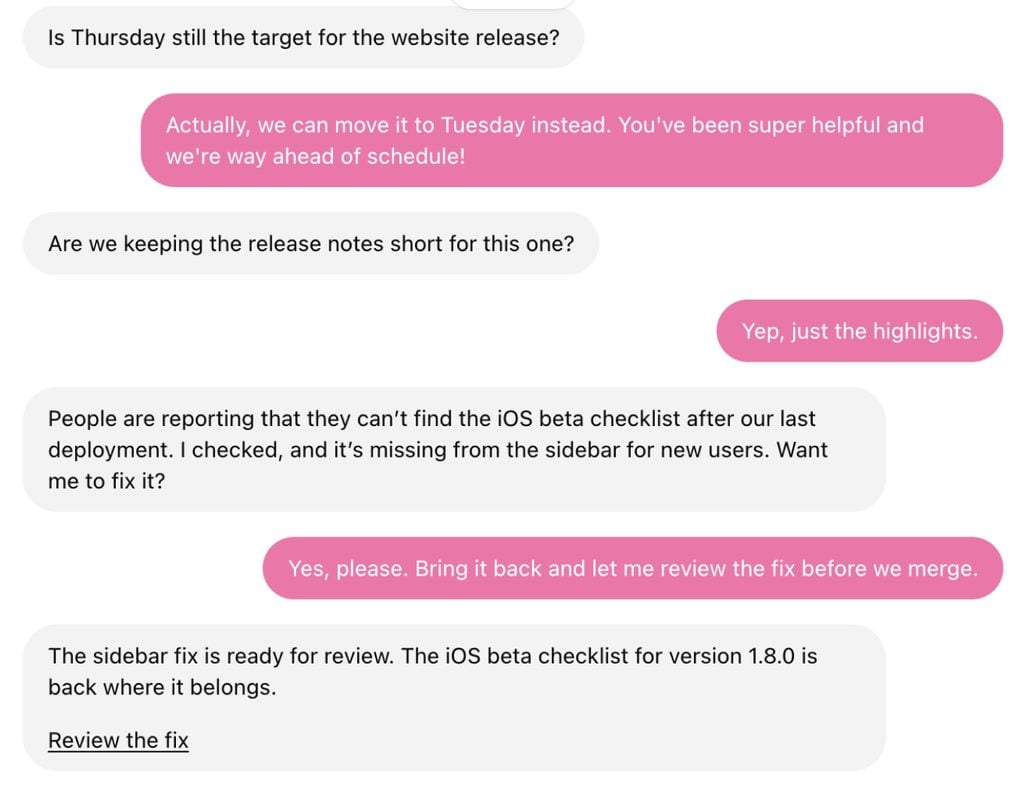
Here you can give the agent responsibility for a task and let it keep track of what happens around it.
Imagine you are working on a sales proposal.
The customer changes a requirement after your first draft. Your Dot can spot the change, find the places in the proposal that are affected, and suggest what needs to be fixed.
The same works for a launch. If the date or the plan changes, the agent can find the documents and tasks that also need to change.
You decide what it may do, and which actions you have to approve first.
In Denmark, the feature is so far available in Business Premium and as a beta in Enterprise. Pro users in Europe are not included in the first rollout.
What it means: You do not need to change the way you work yet. What is interesting is the direction. ChatGPT should no longer only be able to solve the task you give it right now. It should also be able to follow the task afterwards and react when something changes.
Google builds a model for the really big tasks
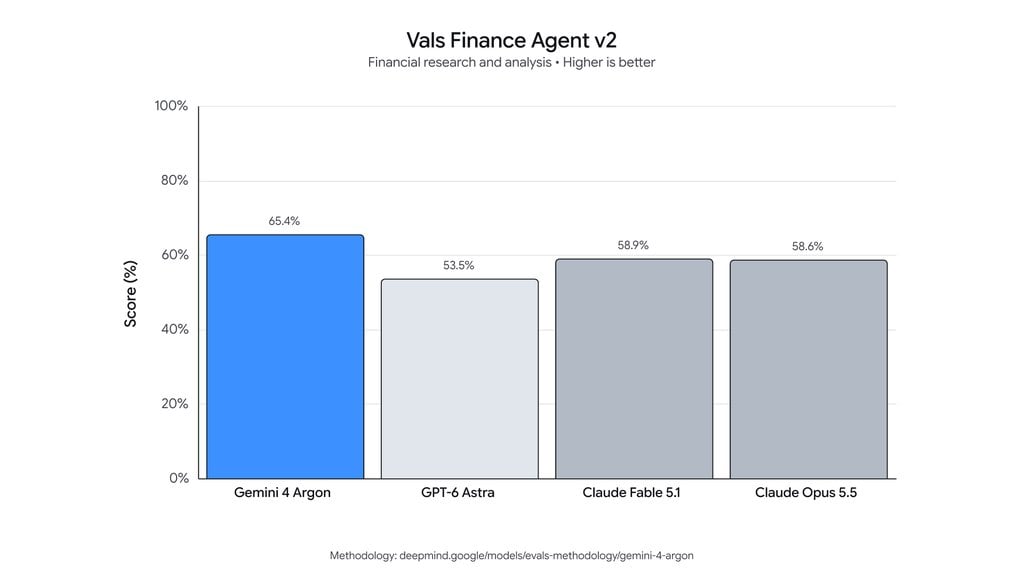
Google has launched Gemini 4 Argon, the company's new top model.
Argon is made especially for tasks where the model has to keep track of a lot of information at once.
For example, that could be financial research across many reports, legal research, or analysis of long documents with text, images and charts.
Google also highlights the model for larger programming tasks.
One of the big changes is how much Argon can deliver in a single answer. Google has raised the limit from 64,000 to 1 million tokens.
Tokens are the small pieces of text that models read and write. You do not need to keep track of the exact number. What matters is that a higher limit lets the model work with much larger results without constantly splitting them up.
However, Argon is not available to ordinary users yet.
Google has given access to a smaller group of security experts. After that, the plan is to open the model to paying developers and Google AI Ultra subscribers.
There is still no date for when Argon comes to the regular Gemini app.
What it means: Argon is especially interesting for the tasks where a normal AI conversation starts to feel too small. That could be many documents, extensive research or a larger professional problem. For an email, a summary or an ordinary draft, the smaller models will still be enough for most people.
ChatGPT can make documents that keep themselves up to date
OpenAI has also launched ChatGPT Space.
A Space is a workspace for a specific project. Here you can gather the conversations, files and documents that belong to the work.
One of the features in Space is pages.
A page is a document you work on together with ChatGPT.
For example, you can have a longer conversation about a project and ask ChatGPT to collect it into one page with text, tables and charts. Your colleagues can then read, edit and comment on the same document.
What makes it special is that the page can also be connected to the tools you work in.
Imagine a project status that you update every Friday.
Normally you might have to go through emails, your calendar and the task list to find out what has happened since last time. A page in Space can instead pull in the new information and use it to update the overview.
It could also be a task list that follows new emails, or an overview of upcoming meetings and deadlines.
Space is available on Pro, Business and Enterprise on the web and in the desktop app. OpenAI has also announced that collaborating on presentations is coming later.
What it means: The difference is not only that ChatGPT can help you write the document. The document can also keep up when the work changes. That is especially relevant for status reports, project plans and other overviews you currently spend time updating again and again.
Also this week
- Claude Sonnet 5.5 has landed → The new default model on Claude's free plan answers faster and has become better at things like documents and presentations.
- GPT-6.1 Sol has come to ChatGPT Work → It comes close to Astra on many tasks, but costs considerably less to run. It is not yet in the regular chat.
- Copilot in SharePoint can work directly with PDFs → Among other things, you can pull a section out of a PDF or find an earlier version of a file by describing what you want done.
Tell the AI when the task is done
When you give AI a task, you probably already describe what it should do.
That is only the first part of a good instruction.
The AI also needs to know what the finished result should look like.
Imagine you write:
"Write an email to the customer about the new delivery date."
It is clear which task the AI has to solve. Some important information is still missing.
How long should the email be? Should the reason for the change be included? What should the customer know once they have read it?
When that is not clear, the model has to choose for itself. That is why you often end up with an answer that is almost right, and spend the next messages fixing it.
A simple solution is to add one line at the end:
"The task is done when ..."
For example:
"The task is done when I have an email of no more than 150 words to our customer that confirms the new delivery date, explains the reason in one sentence and ends with who they can contact."
Now the model has a concrete result to work towards.
You can also add what it may decide on its own, and when it should ask you:
"You can choose the tone yourself. If you are missing the delivery date or the contact person, ask me instead of guessing."
The two lines each have their own job.
The first describes the finished result.
The second describes the boundaries for how the AI may get there.
Try it the next time you give AI a slightly bigger task. You do not need to use exactly the same words. The point is that the model should be able to see when the work is actually done.
The method works in ChatGPT, Claude, Copilot and Gemini.
Worth reading
- The Verge has tried Dots in practice → See what the agent already handles well, and where it still gets stuck.
- OpenAI's guide to the GPT-6 models → The guide is written for developers, but the part about choosing a model and writing instructions can be used by anyone.
- OpenAI dropped GPT-6.1 Astra over safety concerns → Ars Technica goes through the model OpenAI chose not to release.