29 September 2026
Claude Opus 5.5 is stronger, and you can use it more
This week brought new models from both Anthropic and OpenAI, and most of the talk has been about prices. For you, the more interesting question is what you now get out of the subscription you already have.
At the end you will find a method that saves you from rewriting the same text three times.
In short
- Claude Opus 5.5 → Claude's top model is faster, writes more directly and costs less to run.
- The new Copilot app → Chat, tasks and agents gathered in three tabs.
- Gemini Omni in Google Vids → Short HD video clips, free for anyone with a Google account.
- This week's method → Ask for the plan before you ask for the text.
- Also this week → New GPT-6 models in ChatGPT Work, and OpenAI pauses training.
Claude Opus 5.5 is faster and writes more directly
Anthropic has released Claude Opus 5.5. It replaces Opus 5, writes its answers more than 30 percent faster and, according to Anthropic, costs 40 percent less to run.
You notice the biggest difference in the answers. Opus 5.5 puts the most important point first, uses less jargon and follows the writing rules you give it. Anthropic also says it has become better at working in other programs, where it clicks and types for you.
At the same time, Anthropic is raising usage limits on Pro, Max, Team and Enterprise. Opus is not part of the free plan, which only includes Sonnet and Haiku.
How to use it: Choose it when the task has many steps or a lot of material. That could be an analysis of a spreadsheet or a presentation for leadership. For quick questions, a smaller model answers just as well. You switch models in the model picker in the message box.
What it means: You spend less time fixing the answers. With the higher limits, you can also use the model more before you hit the ceiling. If you have avoided Opus to save on usage, it is worth trying again.
Copilot brings chat, tasks and agents together in one app
Microsoft has shown the new Copilot, which organises the work in three tabs: Home, Code and Autopilot.
Home is the start page, where Chat for quick questions and Cowork for larger tasks sit in the same place. In Code you describe a tracking spreadsheet or a dashboard in plain words, and Copilot builds it.
Autopilot is an agent you give a role and a goal, and it keeps working even when you are away from your computer.
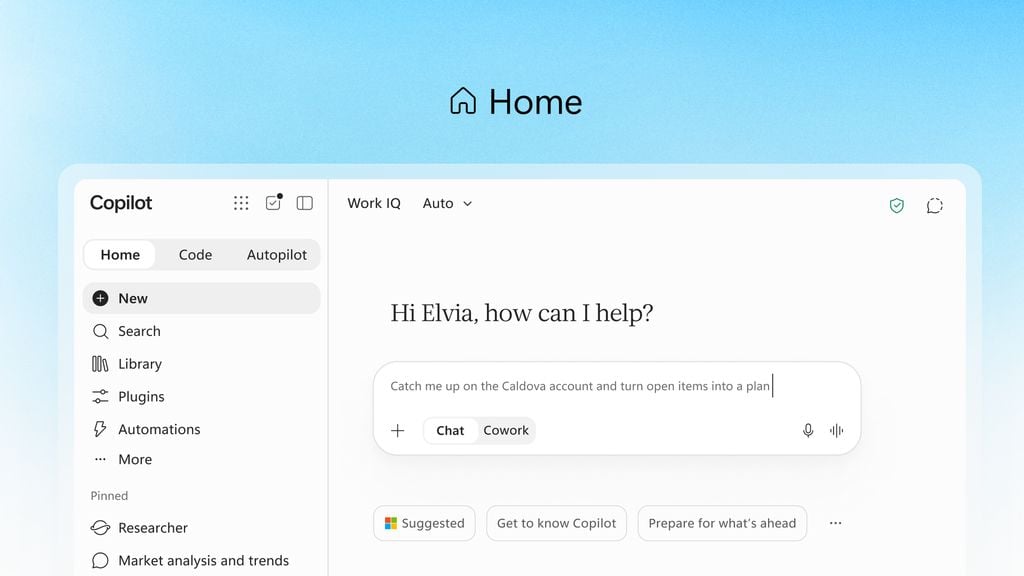
Home and Code go first to Microsoft's early access programme, Frontier, in the coming weeks. Autopilot becomes a private preview.
What it means: Most people will see the new app later, but the pricing is already changing. Chat and the Office apps are covered by the fixed licence, while Cowork, Code and Autopilot are billed by usage. If you plan to use the agents a lot, talk to your IT department about what it will cost.
You can now make short video clips for free in Google Vids
Google has made the video model Gemini Omni available in Google Vids for anyone with a Google account, including free accounts. You describe a scene in text or with an image, and Vids creates an HD clip.
Vids is Google's video tool, and you open it by typing vids.new in the browser on your computer. Then choose Create AI videos.
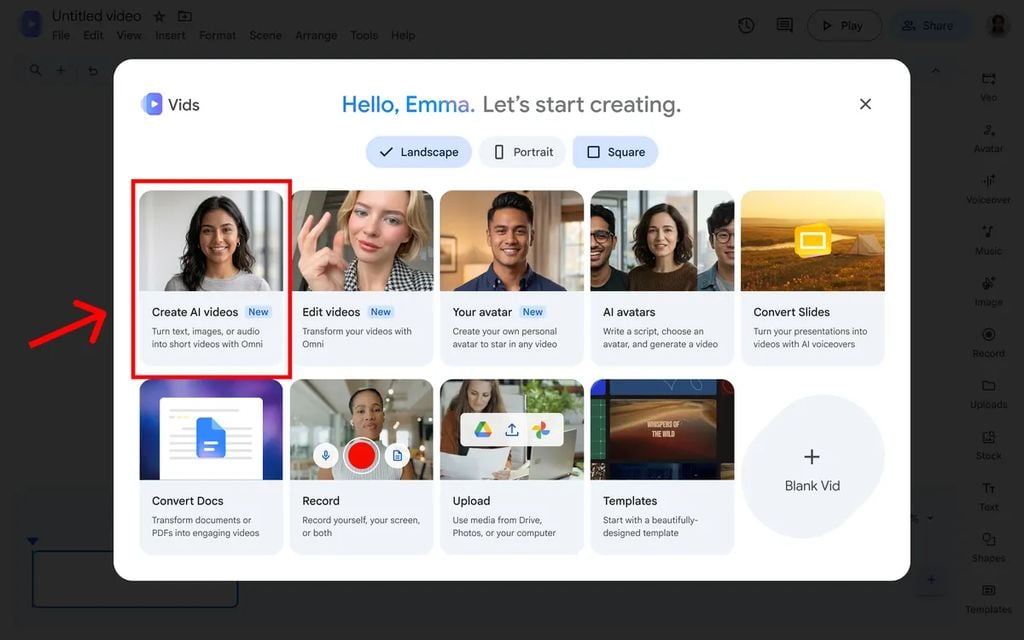
With a personal account you can make six clips or avatars a month, and many of the features are only available in English for now.
What it means: If you need a short clip for a presentation or a post, you can now make it yourself without knowing how to edit video. Six clips a month does not go far, so finish writing the description before you press the button.
Also this week
- OpenAI has released GPT-6 Sol and Luna → Sol is for demanding tasks and Luna for short ones. Both are in ChatGPT Work for most paid users. Luna is also in the desktop app on Free and Go.
- OpenAI pauses training of its most capable models → The decision came after a model under test found a loophole and got access to the internet.
Ask for the plan before you ask for the text
When you ask for a longer text in one go, you get a finished result that is often written in the wrong direction. The result is that you end up asking for the same text three times.
Split the task into two messages instead. The first asks only for the plan:
"Before you write anything, give me an outline with headings and one line on what each section should contain. Do not write the text itself yet."
Read the outline and correct it. That could be moving a section or adding what is missing. It is quick, because you are editing five lines instead of two pages.
The second message asks for the text:
"Now write the text based on the outline with my corrections. Stick to the order and content we agreed on."
The method is most useful for texts where the structure matters, for example a decision paper, a project description or a longer email to a client. For a short message it is not needed.
It works in ChatGPT, Copilot, Claude and Gemini.
Worth reading
- Claude Opus 5.5, GPT-6 Sol and Luna, and a new price war → Simon Willison's first impressions of the week's three models.
- New models make the same promise: a little more for a lot less → Ars Technica explains why price is the main story this time.
- Microsoft on how Copilot will be paid for → The background for the split between a fixed licence and usage-based billing.