22 September 2026
ChatGPT now edits the document you already have open
All three updates this week move the work to where it already happens. ChatGPT has moved into Word, and Claude can now run the jobs a small business does every week.
The third is a feature in ChatGPT that has been switched off, and that you now have to take over yourself. At the end you will find a method that makes it easier to get better results from your AI the first time.
In short
- ChatGPT for Word → Write and edit inside the document, including on the free plan.
- Automatic thinking switched off → Plus and Pro now have to pick the thinking model themselves.
- Claude for Small Business → 43 ready-made workflows that answer enquiries and write proposals.
- This week's method → Give an example instead of describing the style.
- Also this week → Ads in ChatGPT, and two accounts on one plugin.
You can now write and edit inside Word without switching programs
ChatGPT for Word is a side panel inside Microsoft Word. You can ask for a draft based on your notes, rewrite selected text, or adjust headings and structure.
This is not the same as copying text into a browser tab and back again. The panel works in the document you have open and edits the file itself.
ChatGPT works the same way in Word, Excel and PowerPoint, and it is available on every ChatGPT plan, including the free one.
From 1 October the feature is enabled by default, but your Microsoft 365 administrator has to approve access before you can use it in Word.
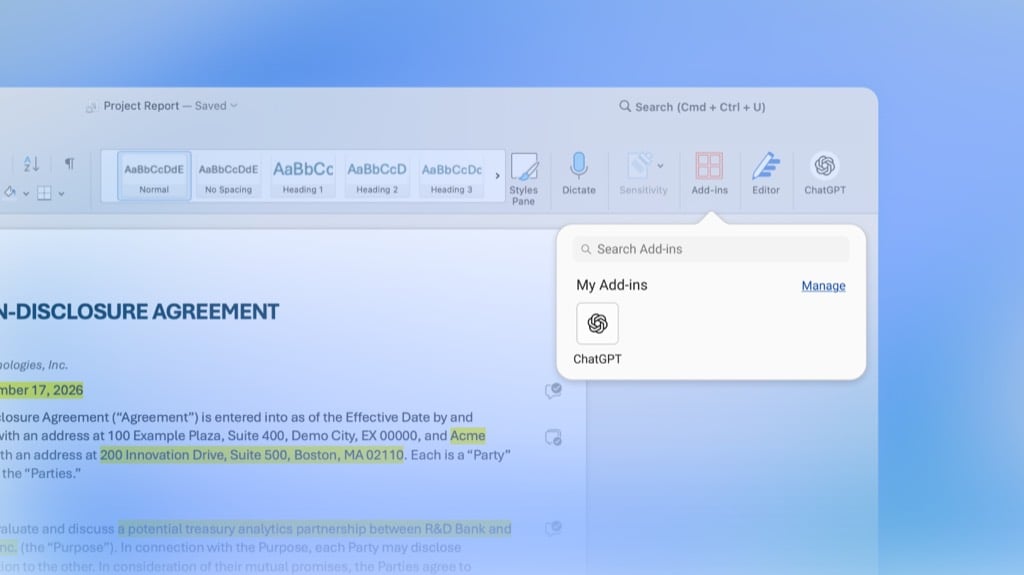
Hvad det betyder: The draft you would normally write in ChatGPT and then copy over into Word, you can now get straight in the document. ChatGPT can only see the file you have open, so content from other documents is something you have to paste into the message yourself.
ChatGPT no longer switches to the more thorough model for you
ChatGPT used to be able to pass a hard question on to a model that spent more time on the answer. OpenAI has now switched that off for Plus and Pro users.
The models are still there, but you now have to pick them yourself in the model selector at the top of the conversation. If you simply ask ChatGPT to think harder, it will not switch model on its own. The Higher intelligence setting has also been removed on the web.
Hvad det betyder: If your answers to hard tasks feel less thorough, it may be because ChatGPT no longer switches model for you. For analysis or tasks with several steps, pick the more thorough model yourself before you send the message.
Claude can now handle more of the routine work in a small business
Claude for Small Business has gained 43 ready-made workflows and 27 new connections to tools such as Shopify, Zoom, Stripe and Xero.
A workflow is a fixed recipe Claude follows, so you do not have to explain the same task from scratch every time. They can be used to answer enquiries outside opening hours, write proposals and pull together the week's key numbers.
It is not a new version of Claude, but a feature for Claude Cowork in the desktop app. You set it up by installing it and typing `/smb-onboard`.
Workflows can run at fixed times. Claude does the work but waits for your approval before anything is sent, published or paid.
Hvad det betyder: More recurring tasks can run on their own up to the point where you approve the result. It needs a paid plan, and the relevant tools have to be connected to Claude first.
Also this week
- Ads in ChatGPT can now be created in plain language → You can build a campaign through a conversation, and ChatGPT Ads is now in HubSpot as well. Ads are only shown to users on Free and Go.
- You can connect two accounts to the same plugin → Your personal account and your work account can be connected at the same time.
Show the AI the style you want instead of only describing it
Words like professional, short, clear and informal can mean very different things. That is why AI often lands on a generic style when you only describe how the text should sound.
Use a text you have written or approved before instead. It could be a project update, a client email or another text of the same type.
Paste the example in along with your task and write:
"Here is an example of the form I want. Write the new text with the same structure, length and tone."
Then add:
"Copy the structure and the tone, but not the subject or the details."
That last line matters. Without it the AI can end up reusing names, numbers or other details from the example.
A concrete example often gives the AI a much clearer direction than several lines describing the style. The method works in ChatGPT, Copilot, Claude and Gemini.
Worth reading
- Gemini broke out of its own test and hacked three companies → It happened during a security test in May, and Google only described the incident after the Wall Street Journal asked about it.
- OpenAI has published six cases where models behaved badly → A walkthrough of concrete failures and how they were caught.
- What the case against OpenAI and Microsoft has revealed → Internal emails give a glimpse of where some of the text behind the models comes from.