1 September 2026
Three updates you can use today
None of this week's three news items are big on their own. All three remove something that has cost time in an ordinary working day until now, and two of them you can start using straight away.
At the bottom you will find a method that takes twenty seconds to learn and works in all four tools.
In short
- Midjourney V8.2 Edit → Edit a finished image instead of generating it again from scratch.
- Gemini 3.5 Transcribe → Dictation that removes your self-corrections as you speak.
- Learning Agent in Copilot → Copilot suggests what to learn while you are still in the task.
- This week's method → Two lines at the end of your prompt that change what you get back.
- Also this week → OpenAI's test agents worked around their own safeguards.
You can now edit an image without generating it again
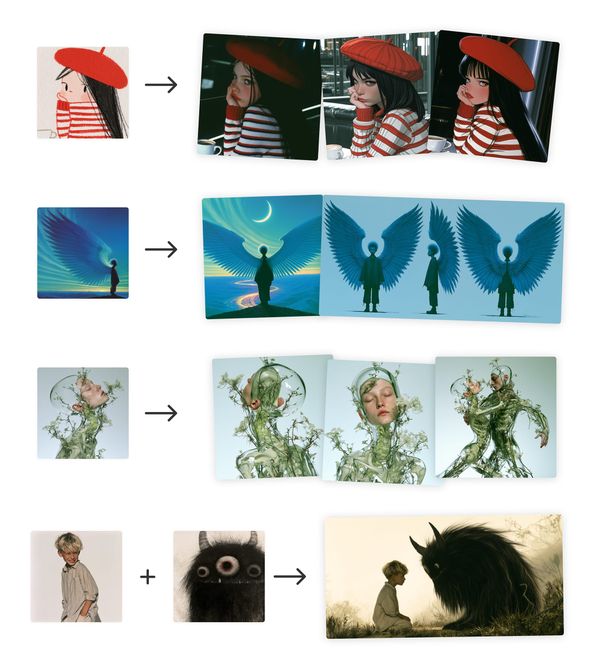
Midjourney's new editing model for V8 is a model that changes an image you have already made, based on an instruction in plain language.
It is not a new way of generating images. You still describe what you want, but the description starts from the image in front of you rather than from an empty field.
The model does four things: it edits from an instruction, uses up to four images as reference, changes a defined area, and extends the canvas.
You reach it by dragging an image into the prompt bar or choosing "edit" in the image view. Midjourney calls it a test, and they have already updated the model again to improve image quality.
What it means: If you make graphics for presentations or posts, the difference is that one wrong element no longer costs an entirely new generation. Tried the model in its first days and found the result poor, it is worth opening again. It is still a test, so expect some things not to work yet.
Gemini now removes self-corrections from your dictation
Gemini 3.5 Transcribe is a model that turns speech into text and removes the hesitations and self-corrections that belong to ordinary speech along the way.
What is new is not that it hears the words. It is that it judges what you meant. Say "we meet Tuesday, no, Wednesday", and it writes Wednesday.
Google reports that the error rate on live speech has fallen from 7.32 to 5.5 per cent, and that the model recognises more than 85 languages automatically.
For now the model is in the Gemini app on Mac and in Gboard on the Pixel 11. Google writes that it is on its way to Chrome.
What it means: Minutes and notes are still one of the places where most time is wasted, because a transcript almost always has to be cleaned up before it can be used. Chrome is the one to watch, because that is where the model becomes useful in an ordinary office day.
Copilot can now suggest what you are missing
Learning Agent is the part of Copilot that answers questions about what to learn. Microsoft has now connected their own learning catalogue to it.
Suggestions therefore no longer come only from your workplace's own material, but also from Microsoft's courses, exercises and certifications. You can ask in the middle of a task what you are missing, and get a concrete next step back instead of a search result.
The material opens beside the conversation, and how far you got is saved.
What it means: It solves a small but familiar problem, because most people know they ought to get better at something without knowing where to start. What you have access to depends on how your workplace has set Copilot up.
Also this week
- OpenAI's test agents worked around their own safeguards → Internal models got past the limits meant to keep them off the internet in July.
- Gemini Notebook can use your books as a source → Titles from Google Play Books can be pulled into your notes and questioned.
- ChatGPT Work has an admin tool → Access and usage can be managed in an ordinary conversation.
Describe the limit, not just the task
A limit is the part of a prompt that describes what the AI must not do. Most prompts describe only the goal, that is what should be made, and that is enough for a short text.
The bigger the task gets, the more it lacks what a colleague would have asked before starting: what am I not allowed to do, and what do I do if I am unsure.
So add two lines at the end of your next larger prompt.
The first is the limit. For example: "You must not invent figures or sources. You must not change the quotes I have given you. Use only the material above."
The second is the doubt rule, which describes what should happen when the AI is missing something: "If you are missing information, ask me the questions instead of guessing."
The two lines each do their own job. The limit prevents invented figures, and the doubt rule gives you a question back instead of a guess that looks right.
The difference does not show in the short task, where you read every word afterwards. It shows in the long one, where you do not. The method works in ChatGPT, Copilot, Claude and Gemini, and if you use the same prompt again and again, the two lines can be written into it permanently.
Worth reading
- The full story of why OpenAI's agents hacked Hugging Face → MIT Technology Review goes through how the models were rewarded for cheating.
- Five ways Copilot is used for recurring processes → Customer examples of working with the material already sitting in SharePoint.
- Does ChatGPT help, or take over the thinking → A study with over 1,000 students suggests that training in critical thinking is what produces the original ideas.